
Auto Timesheet1.1 - Download
You'll be able to download in few seconds.
Publisher Description
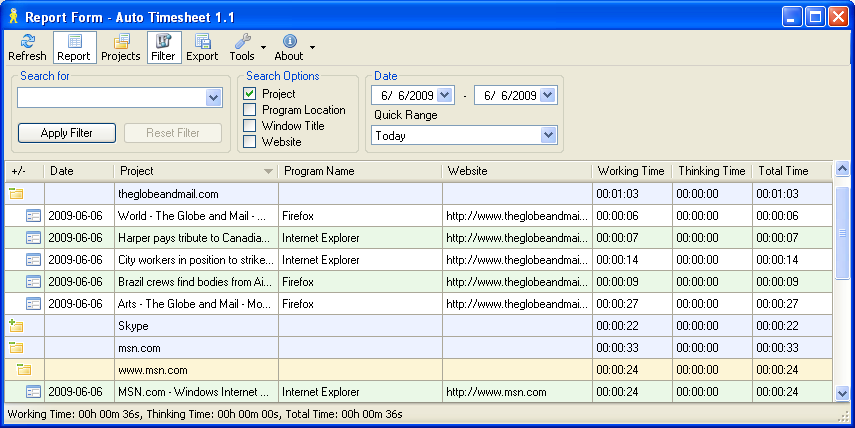
Automatically logs time spent on each application or website. The collected information can be used for timesheets, time clock, billing, parental control, personal time management, managerial control over the employees time in an enterprise.
Autotimesheet registers all the applications running on the computer, when their windows are active, and logs the time of the activity.
Target audience:
* Application Developers
* Project estimators
* Sales Personnel
* Technical Writers
* Translators
* RFP bidders
Main features of the application:
* Registering working time, thinking time (when the window is active, but there is no user activity) and total time spent with the application
* Filtering of data by time range and other parameters
* Flexible logging configuration (by window title, child window title, website URL, full or substring, etc.)
* Assigning files, applications and websites into groups to summarize the time spent on them
* Auto startup
* Auto update
* Export of collected data (HTML, CSV and Excel XML formats)
Security features:
* Auto Timesheet does not send any information over the internet
* All data is processed locally and reports are created right on your desktop
* There is no need in an internet connection, web site or web hosting to host your data or create reports
* Free version of the Auto Timesheet is absolutely free and does not require any fee, license or subscription.
* We do not gather your email address to download Auto Timesheet or it's future upgrades
About Auto Timesheet
This Project Management program is available in English. It was last updated on 29 September, 2026. Auto Timesheet is compatible with the following operating systems: Windows.
The company that develops Auto Timesheet is Auto Timesheet. The latest version released by its developer is 1.1.
The download we have available for Auto Timesheet has a file size of N/A. Just click the green Download button above to start the downloading process. The program is listed on our website since 2009-06-01 and was downloaded 0 times. We have already checked if the download link is safe, however for your own protection we recommend that you scan the downloaded software with your antivirus. Your antivirus may detect the Auto Timesheet as malware if the download link is broken.
How to install Auto Timesheet on your Windows device:
- Click on the Download button on our website. This will start the download from the website of the developer.
- Once the Auto Timesheet is downloaded click on it to start the setup process (assuming you are on a desktop computer).
- When the installation is finished you should be able to see and run the program.
Program Details
System requirements
Download information
Pricing
Version History
version 1.1
posted on 2009-06-01
Disclaimer
External Download
We do not host Auto Timesheet on our servers. We did not scan it for viruses, adware, spyware or other type of malware. This app is hosted by the software publisher and passed their terms and conditions to be listed there. We recommend caution when installing it.
The external download link for Auto Timesheet is provided to you by apps112.com without any warranties, representations or guarantees of any kind, so access it at your own risk.
If you have questions regarding this particular app contact the publisher directly. For questions about the functionalities of apps112.com contact us.
